To all those loyal Cisco VPN customers, some exciting news. Cisco has announced the release of ASA 8.0 and the long-awaited AnyConnect VPN Client. Release notes for ASA 8.0 can be found here, while release notes for AnyConnect can be found here. Lots of reading to keep everyone busy. Very exciting news for those admins waiting to support Vista VPN connections. Hopefully I'll get some time in the coming weeks to get this loaded into the lab and play around with it. Expect to see ASA and AnyConnect updates to be available for notification via CMPC very soon!
-Mike
Monday, June 18, 2007


Friday, June 15, 2007
Some of My Favorite Links
I know my blog may seem like the best resource for everything networking, but I have to share the love (hmm... if blogger only had a button for showing sarcasm). There are some terrific resources available out there and I wanted to take a post to dedicate to linking to some fellow bloggers and project from around the Internet.
Blogs:
- Cisco MARS Blog - A terrific blog operated by Chris from the UK. Chris shares a wealth of knowledge about his MARS experiences in his excellent and detailed posts.
- Network Response - Another terrific blog by Chris. This one is more focused on security offerings from Cisco other than MARS.
- Cisco Blog - A general Cisco blog from JC. Offers some very well written posts about some advanced Cisco networking topics. Gave me the inspiration to start this blog.
Projects (free network sh*t!!):
- Cacti - An amazing open-source project aimed at providing an easy-to-use web interface for graphing a variety of SNMP statisticis. Highly customizable and a very extensive plugin offering available via their forums. I'll soon integrate this into CMPC to provide notification when updates are available.
- IPPlan - Another amazing open-source project. This one aims to provide an architecture to manage IP address tracking and provisioning. If you have any more than 5 subnets... download this and love it. I'll soon integrate this into CMPC to provide notification when updates are available.
- Nessus - Software provides one of the most extensive network threat scanners I have ever dealt with. This used to be very hard to use and configure... but the Windows version is ridiculously easy to configure. I'll soon integrate this into CMPC to provide notification when updates are available.
-Mike
Blogs:
- Cisco MARS Blog - A terrific blog operated by Chris from the UK. Chris shares a wealth of knowledge about his MARS experiences in his excellent and detailed posts.
- Network Response - Another terrific blog by Chris. This one is more focused on security offerings from Cisco other than MARS.
- Cisco Blog - A general Cisco blog from JC. Offers some very well written posts about some advanced Cisco networking topics. Gave me the inspiration to start this blog.
Projects (free network sh*t!!):
- Cacti - An amazing open-source project aimed at providing an easy-to-use web interface for graphing a variety of SNMP statisticis. Highly customizable and a very extensive plugin offering available via their forums. I'll soon integrate this into CMPC to provide notification when updates are available.
- IPPlan - Another amazing open-source project. This one aims to provide an architecture to manage IP address tracking and provisioning. If you have any more than 5 subnets... download this and love it. I'll soon integrate this into CMPC to provide notification when updates are available.
- Nessus - Software provides one of the most extensive network threat scanners I have ever dealt with. This used to be very hard to use and configure... but the Windows version is ridiculously easy to configure. I'll soon integrate this into CMPC to provide notification when updates are available.
-Mike
Thursday, June 14, 2007
CS-MARS Package Checker (CMPC) v1.0.0.0 Released
I'm pleased to announce the first release of CMPC v1.0.0.0. You may download the distribution from the following location:
http://www.mediafire.com/?c2wwmbmbzxh
Enjoy and leave feedback!
-Mike
http://www.mediafire.com/?c2wwmbmbzxh
Enjoy and leave feedback!
-Mike
Wednesday, June 13, 2007
CS-MARS Package Checker (CMPC) v1.0.0.0 Upcoming Release
As promised... CS-MARS Package Checker (CMPC) will be released within the next 24 hours. I'm finalizing some code clean-up and the first release should be ready very soon. As a preview, here's the readme that will be included with the release (doesn't paste well into Blogger... sorry for formatting):
CS-MARS Package Checker (CMPC) v1.0.0.0 readme.txt
Updated June 11, 2007 by Mike
Send all feedback/comments/problems to ****** or let me know on my
blog at http://cs-mars.blogspot.com
WHAT IS CS-MARS PACKAGE CHECKER?
================================
CS-MARS Package Checker (more easily written as CMPC) is a tool to help the
growing user community of the Cisco MARS appliance keep it's rules up-to-date.
It's very basic by design, but wildly useful. It quite simply parses the
required information from an XML configuration file, uses the CCO credentials
to log into cisco.com to check for updated packages, and e-mails the results
to a specified e-mail.
CMPC is current developed as a command line executable. This was easier to port
nearly directly from the first implementation written in PERL under Linux.
Feedback is appreciated on the design, but it is already planned to migrate to
a standard executable.
INSTALLATION
============
The installation of CMPC is rather basic:
- Extract to program archive cmpc.zip. This archive should contain:
- cmpc.exe
- config.xml
- readme.txt
- You may place these files wherever you see fit. The only requirement is that
the cmpc.exe and config.xml are within the same directory. The easiest
location may be something such as C:\CMPC\
CONFIGURING CMPC TO RUN
=======================
Configuration of CMPC for runtime is handled through the included config.xml
configuration file. Open the file in your favorite text editor and fill in all
fields like so:
someuser@company.com
Securepassword123
smtp.company.com
myemail@company.com
Please keep in mind that all fields are required. Certain validity checks are
run while CMPC processing, but a majority of issues running this program are
sourced from an incorrect config.xml. Support is always available on my blog
or by e-mailing me at ******.
REMOVAL
=======
Simply remove the directory in which you installed CMPC.
PROBLEMS USING CMPC
===================
CMPC has been developed to catch most exceptions and give informative errors
when issues occur. That being said, errors do occur that I may not catch. If
you are running the cmpc.exe executable from Windows XP, the error output may be hard to catch as the dialog will close after erroring. To solve this, open up
the Windows XP command prompt and run the cmpc.exe executable from there. This should allow you to see the error output. If you receive a cryptic error
message, let me know and I'll debug the code on my side.
CMPC HISTORY
============
Apr 27, 2005 v1.0.0.0
- Initial release.
CS-MARS Package Checker (CMPC) v1.0.0.0 readme.txt
Updated June 11, 2007 by Mike
Send all feedback/comments/problems to ****** or let me know on my
blog at http://cs-mars.blogspot.com
WHAT IS CS-MARS PACKAGE CHECKER?
================================
CS-MARS Package Checker (more easily written as CMPC) is a tool to help the
growing user community of the Cisco MARS appliance keep it's rules up-to-date.
It's very basic by design, but wildly useful. It quite simply parses the
required information from an XML configuration file, uses the CCO credentials
to log into cisco.com to check for updated packages, and e-mails the results
to a specified e-mail.
CMPC is current developed as a command line executable. This was easier to port
nearly directly from the first implementation written in PERL under Linux.
Feedback is appreciated on the design, but it is already planned to migrate to
a standard executable.
INSTALLATION
============
The installation of CMPC is rather basic:
- Extract to program archive cmpc.zip. This archive should contain:
- cmpc.exe
- config.xml
- readme.txt
- You may place these files wherever you see fit. The only requirement is that
the cmpc.exe and config.xml are within the same directory. The easiest
location may be something such as C:\CMPC\
CONFIGURING CMPC TO RUN
=======================
Configuration of CMPC for runtime is handled through the included config.xml
configuration file. Open the file in your favorite text editor and fill in all
fields like so:
Please keep in mind that all fields are required. Certain validity checks are
run while CMPC processing, but a majority of issues running this program are
sourced from an incorrect config.xml. Support is always available on my blog
or by e-mailing me at ******.
REMOVAL
=======
Simply remove the directory in which you installed CMPC.
PROBLEMS USING CMPC
===================
CMPC has been developed to catch most exceptions and give informative errors
when issues occur. That being said, errors do occur that I may not catch. If
you are running the cmpc.exe executable from Windows XP, the error output may be hard to catch as the dialog will close after erroring. To solve this, open up
the Windows XP command prompt and run the cmpc.exe executable from there. This should allow you to see the error output. If you receive a cryptic error
message, let me know and I'll debug the code on my side.
CMPC HISTORY
============
Apr 27, 2005 v1.0.0.0
- Initial release.
Saturday, June 02, 2007
CS-MARS Package Checker: Keeping your MARS appliance up to date
I just thought I'd put a quick blurb about an upcoming release that will be showing up on this blog soon. I'm in the process of finalizing a program I originally wrote for myself that helps me keep my MARS appliance (and some other Cisco products) up to date. The concept behind the program is for it to, on a defined basis, automatically check CCO for the latest device packages and e-mail them to you.
CS-MARS, like most security devices, is only as useful as the known threats built into the device. Anyone who operates an IPS/IDS device knows how critical it is to keep such a device up-to-date. CS-MARS is no different. Cisco provides no avenue for automated update checking, so rather than remembering to check CCO every once and a while for package, this program does it all for me, and soon for you.
It's very basic in operation. It was originally written in Perl and ran under Linux, but has since been ported to C# for usability. It's an executable, an XML configuration file, and scheduling is done through Windows (scheduled taks). Simply configure the XML file with your CCO credentials, SMTP server, and the From/To mail account. After then, you can execute the program at your leisure or schedule it through Windows.
Though this may sounds simple, it's a wildly useful tool. It's so useful, I've begun re-writing it to allow checking of other packages. It now e-mails me daily with the latest packages for CS-MARS, Unified Wireless, ASA/PIX images, and WAAS updates. Don't expect the first release to have the feature of checking for updates for other products, but it is a planned add-on for later releases. Input about other products you'd like to see have similar notifications is welcomed. Just add a comment to this post!
I'm bringing up the topic of this app now because I don't want my blog to simply be me throwing up information onto the Internet (though if I drink Jack Daniels... well.. different topic). I want input from anyone that has anything to say. I'm wrapping up development now in my free time, but I'd like to hear input about whether this would be useful or not. Drop a comment or two and expect to see the release in the coming weeks.
CS-MARS, like most security devices, is only as useful as the known threats built into the device. Anyone who operates an IPS/IDS device knows how critical it is to keep such a device up-to-date. CS-MARS is no different. Cisco provides no avenue for automated update checking, so rather than remembering to check CCO every once and a while for package, this program does it all for me, and soon for you.
It's very basic in operation. It was originally written in Perl and ran under Linux, but has since been ported to C# for usability. It's an executable, an XML configuration file, and scheduling is done through Windows (scheduled taks). Simply configure the XML file with your CCO credentials, SMTP server, and the From/To mail account. After then, you can execute the program at your leisure or schedule it through Windows.
Though this may sounds simple, it's a wildly useful tool. It's so useful, I've begun re-writing it to allow checking of other packages. It now e-mails me daily with the latest packages for CS-MARS, Unified Wireless, ASA/PIX images, and WAAS updates. Don't expect the first release to have the feature of checking for updates for other products, but it is a planned add-on for later releases. Input about other products you'd like to see have similar notifications is welcomed. Just add a comment to this post!
I'm bringing up the topic of this app now because I don't want my blog to simply be me throwing up information onto the Internet (though if I drink Jack Daniels... well.. different topic). I want input from anyone that has anything to say. I'm wrapping up development now in my free time, but I'd like to hear input about whether this would be useful or not. Drop a comment or two and expect to see the release in the coming weeks.
Friday, May 25, 2007
Unified Wireless Guest Access: Authenticating Users
Continuing on my series of Unified Wireless Guest Access, I want to dive further into detail about configuring authentication for guest users. Why even go so far as to make the users authenticate? Well the most obvious answer is security. If you have open access with no authentication, any user can just walk into your facility, or even sit just outside if the wireless coverage allows it and be on your network. Though they'll be limited to Internet access, any bandwidth alloted can be saturated by an unknown user. Imagine having a saturated Internet connection and all you have is a MAC address to indentify the user with.
So what type of options does Cisco give us for "out-of-the-box" authentication of users? We have:
- Web Policy - Authentication
- Web Policy - Passthrough
- Web Policy - Conditional Web Redirect
For actual guest user authentication, I'm going to focus on using the "Web Policy - Authentication" option. Using this security policy (as configured under our guest SSID), a guest user is re-directed to login if his/her wireless card has just associated to an open SSID and a browser is opened. This is very similar to setups you see in hotels and airports. For this example we will use the canned authentication scheme that Cisco has designed. This requires that a username and password be created for all guest users. With this username/password combination, he or she will authenticate to the guest SSID and be given guest wireless access for a defined period of time.
The first place to start is with the basic guest authentication screen. This is accessed by clicking Security -> Web Login Page. You can do some basic HTML customization and change titles. Use and abuse the "Preview..." button to make sure it looks like how you would expect. Next... let's take a look at how a guest user is created. Click on Security -> AAA: Local Net Users -> New... Fill out the fields as seen below. Make sure to create the user as a Guest user so you an enable timing out the account. Once the account is created... the user may now login through the guest web portal you designed above.

Sounds like a good plan, right? Well, the issue I take with this is that it requires your receptionists to access a controller to build in a username and password. I'm thinking an easier way would be to provide some front-end to a receptionist to allow him or her to simply enter a username to authorize a users. The guest user then builds his or her own password and provides a company name to be used for authentication. Problem is... this is not how guest access was designed by Cisco and will require some programming on our side. Interested how this is done? Stay tuned for an in-depth view behind how guest users are created and how we can customize a front-end for guest user registration.
Wednesday, March 28, 2007
Unified Wireless Guest Access: Prep'ing the Controller
Continuing on with my discussion of UW and Guest Access, I'd like to go into some detail about how to configure your master controller (the "nexus") to access the guest network. Before we continue we have to have an idea how we want to design our guest network. The goal of the guest network is to allow Internet access that is segemented from all other internal network resources. How this is developed is completely up to your implementation. I'll use our configuration as an example. Our existing guest access is handle through a non-routed VLAN that's switched via our L2 core. For the sake of examples... we'll say this VLAN is VLAN 125.

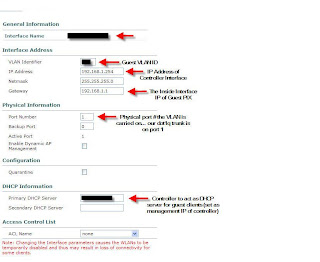
As I stated this is a non-routed VLAN that in our example will use the IP scheme of 192.68.1.X. The VLAN has a default gateway of 192.168.1.1, which is PIX 506E that has an outside interface on our Internet segment. All clients on this network are NAT'd through the PIX, completely seperate from our existing ASA cluster that's used for employees. This keeps the guest segment completely separate from our existing IP routing infrastructure. Here's an overview of the design.

Now let's get into how this is configured on the WLAN Controller. Please note that the configuration is being done on version 4.0.206.0 of the WLC. The first step for creating a new WLAN is to create an interface on the controller for the clients. I'll be using the WLC GUI for the configuration. Go to CONTROLLER -> Interfaces -> New... This will bring you to the dialog to build in the new guest interface. Give the interface any name and tag the VLAN for the guest VLAN. So... in my example I'll use VLAN 125. Fill in the fields noted below.

The above image should explain this part of the configration for the most part. I'd just like to note the importance of the DHCP server option field. Ensure that you are placing the IP of the management interface of the controller. Using any other IP address on the controller will not work. Next lets build the DHCP pool that will be required for the clients. You have the option of using an external DHCP server, but we have opted to use the server local to the WLC. To access the DHCP options, click CONTROLLER -> Internal DHCP Server. Create a new scope and set the necessary options. I don't need to show this as it's very self-explanatory. Obviously we'll set the PIX as the "Default Router" and DNS is provided by an open DNS server on the Internet. You can use your own outside DNS server if you wish.
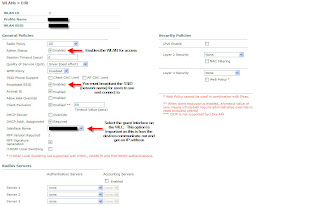
Our final step is to setup the WLAN... which for now will have no authentication. To create a WLAN... to to WLANs -> WLANs -> New... Give it an ID and the profile name can be "Open Access" and the WLAN SSID can be something like "Open Internet Access." This is the name of the WLAN that will be shown on the users laptops. Now lets get into the details. Note the options I have arrows next to.

Again... a pretty easy configuration. Once this step is complete you should be able to connect to your guest SSID and get Internet access. This is just the first step in providing Guest Access. In future posts I'll review enabling web authentication along with developing a customizable interface for users to register that ties into the WLC local user database. Leave feedback and let me know if you're unsure about anything or if I can help at all.
Tuesday, March 27, 2007
Unified Wireless: My Take on Guest Access
As I said in a previous post, I've been working on a Cisco Unified Wireless implementation. I gave a brief overview of UW (unified wireless) below, but I want to go into depth on the topic of Guest Access. The documentation is limited and I just want to take some time to share how I'm implementing Guest Access and the configuration required.
Guest Access is pretty much what it sounds like. It's taking your wireless infrastructure and allowing "guest" users to access it while keeping your existing UW infrastructure secure. This could be used to provide Internet access to vendors visiting your facilities, or could go beyond and actually act as a open hotspot for customers. The version of Guest Access I'm working on involves allowing guests at our corporate campus to use our Internet connectivity for presentations/remote VPN access. Our corporate campus is comprised of multiple facilities all linked over our private MPLS VPN cloud.
Let me go a little bit into the architecture behind the implementation. In our headquarters facility we have installed a Cisco 4402 Wireless LAN controller. This controller acts as the "nexus" for our Guest Access infrastructure, along with allowing secure access to internal network resources for mobile employees. Our satellite offices, also part of the corporate campus, are all connected via Cisco 2811 Integrated Services Routers. In these offices we will be using NM-WLC-6 network modules. Essentially these modules are Wireless LAN Controllers which sit on-board ISR routers.
I don't want to get too in-depth with Guest Access this first post. Let me leave with a quick diagram of how I've decided to implement Guest Access. In future posts I'll go into detail as to how this can be implemented. Keep in mind that my implementation may not be the same as yours, but the concepts I use may be shared amongst many implementations.

Guest Access is pretty much what it sounds like. It's taking your wireless infrastructure and allowing "guest" users to access it while keeping your existing UW infrastructure secure. This could be used to provide Internet access to vendors visiting your facilities, or could go beyond and actually act as a open hotspot for customers. The version of Guest Access I'm working on involves allowing guests at our corporate campus to use our Internet connectivity for presentations/remote VPN access. Our corporate campus is comprised of multiple facilities all linked over our private MPLS VPN cloud.
Let me go a little bit into the architecture behind the implementation. In our headquarters facility we have installed a Cisco 4402 Wireless LAN controller. This controller acts as the "nexus" for our Guest Access infrastructure, along with allowing secure access to internal network resources for mobile employees. Our satellite offices, also part of the corporate campus, are all connected via Cisco 2811 Integrated Services Routers. In these offices we will be using NM-WLC-6 network modules. Essentially these modules are Wireless LAN Controllers which sit on-board ISR routers.
I don't want to get too in-depth with Guest Access this first post. Let me leave with a quick diagram of how I've decided to implement Guest Access. In future posts I'll go into detail as to how this can be implemented. Keep in mind that my implementation may not be the same as yours, but the concepts I use may be shared amongst many implementations.

Thursday, March 22, 2007
CS-MARS v4.2.5(2456) Available!
To all those CS-MARS owners... Cisco has released a new version of CS-MARS. This update includes numerous signature updates, along with a slew of resolved caveats. Make sure to check out the details here before updating.
And in other news...our Clean Access project has been placed on hold to focus resources on a new Cisco Unified Wireless implementation. The budget money was available, so the equipment is here and the system is being developed. The unified wireless system focuses on extending security across your wireless network while enabling services that are normally available to only wired clients. Keep an eye out for details on our implementation... along with some in-depth discussion as to how we'll be handling guest access in the near future.
And in other news...our Clean Access project has been placed on hold to focus resources on a new Cisco Unified Wireless implementation. The budget money was available, so the equipment is here and the system is being developed. The unified wireless system focuses on extending security across your wireless network while enabling services that are normally available to only wired clients. Keep an eye out for details on our implementation... along with some in-depth discussion as to how we'll be handling guest access in the near future.
Tuesday, March 06, 2007
The World of Clean Access
Another update from the front lines of network security. I hope everyone has been well and keeping busy in this ever evolving market. While this blog does focus on CS-MARS... over the next few weeks you'll begin to see me post updates about "everything security at Cisco." My most recent project has me working on a terrific product from Cisco known as Clean Access (aka Cisco NAC Appliance). For those of you in the dark, NAC is a framework and methodology for network security in which security is no longer exclusively adapted in network infrastructure devices, but also end-user work stations.
Let me go into a little detail about Cisco Clean Access (CCA) and how it will be used in our environment. CCA is comprised of a Clean Access Manager (CAM) and Clean Access Server (CAS). The CAM dictates all the policies required to gain access to the network, while the CAS handles authentication of workstations and quarantining as necessary. Both are required components of a Clean Access implementation.
During our initial pilot we will be validating workstations from a remote office, along with select users in our headquarters facility. This brings up some issues that can all be solved based upon the CCA implementation that is selected. Now this update is just a brief overview of my most recent project... but expect updates soon about the infrastructure concepts involved in CCA and some of the configuration involved with the project. The resources on Clean Access are limited on the Internet, so I do want to dedicate a portion of this blog to this exciting product. Continue to expect updates about CS-MARS... along with other Cisco security updates.
-Mike
Let me go into a little detail about Cisco Clean Access (CCA) and how it will be used in our environment. CCA is comprised of a Clean Access Manager (CAM) and Clean Access Server (CAS). The CAM dictates all the policies required to gain access to the network, while the CAS handles authentication of workstations and quarantining as necessary. Both are required components of a Clean Access implementation.
During our initial pilot we will be validating workstations from a remote office, along with select users in our headquarters facility. This brings up some issues that can all be solved based upon the CCA implementation that is selected. Now this update is just a brief overview of my most recent project... but expect updates soon about the infrastructure concepts involved in CCA and some of the configuration involved with the project. The resources on Clean Access are limited on the Internet, so I do want to dedicate a portion of this blog to this exciting product. Continue to expect updates about CS-MARS... along with other Cisco security updates.
-Mike
Friday, February 16, 2007
CS-MARS 4.2.4 Released!
Hey everyone!
Just a quick note letting everyone know that CS-MARS v4.2.4 has been released. The most important update is for those of us under stress about the upcoming DST change.:
Just a quick note letting everyone know that CS-MARS v4.2.4 has been released. The most important update is for those of us under stress about the upcoming DST change.:
Support for Extended Daylight Savings Time. On March 11, 2007, the United States will adjust to Daylight Saving Time (DST) three weeks earlier than previous years and will end one week later on November 4, 2007. As per the Energy Policy Act of 2005, MARS supports this change in 4.2.4.
Wednesday, February 07, 2007
Security News: Cisco Update Security Portfolio
Great news for those of us using Cisco security hardware. Cisco is updating it's entire security portfolio for enhanced product integration. Updates include:
- Adaptive Security Appliance v8.0
- Cisco IPS v6.0
- Cisco Security Agent v5.2
- CS-MARS v4.3
- Cisco Security Manager v3.1
As you can see nearly every product that is part of the "Self-Defending Network" is being enhanced to support this tighter integration. Of big note is the ASA v8 release, with numerous enhancement to the SSL VPN capabilities of the ASAs. SSL VPN is the next generation of secure remote network access. Below are these enhancements. Note that a new VPN client is to be released... known as "AnyConnect." This appears to be the Cisco-supported Vista VPN client that will be used going forward.
- Clientless VPN with enhanced portal design for highly customizable user experience including personalized bookmarks, RSS feeds, and localization support.
- Cisco's next-generation "AnyConnect" VPN client, with broader operating system support for Microsoft Vista and Windows, MAC OS X, and Linux.
- Cisco AnyConnect Mobile VPN client supports Windows Mobile 5.0 Pocket PC Edition.
- Optimized network access for voice over IP (VoIP) and other latency-sensitive traffic.
- Ability to create "smart tunnels" that provide policy-driven applications specific access without requiring administrative rights.
- Embedded Certificate Authority (CA) and additional user credential options simplify authentication.
- Direct mapping of Windows Active Directory membership to VPN access simplifies IT's security management by automatically granting users appropriate VPN permissions.
- Posture-assessment extensions adjust users' VPN permissions more efficiently.
- Intuitive management via ASA's Adaptive Security Device Manager, CSM 3.1.
Note that the full press release can be found here. It looks like some exciting changes are happening with Cisco's security portfolio. Make sure to check in for the latest updates as I get them.
Tuesday, January 16, 2007
IPS Troubleshooting: "The root element is required in a well-formed document"
Two updates in one day... I must feel really guilty about not keeping up with this. I thought I'd share a recent issue I had on a couple of our IPS 4215 sensors while importing it to the IPS MC (again... this is the CiscoWorks management console for IPS sensors). The issue occurred when I had updated the IPS sensors to the latest code at the time (5.1(3)) and then attempted to import their configurations into the IPS MC to be managed. I would get this absolutely meaningless error:
ERROR 13:42:28 [main] - (Log.java:198) - IPS-TEST -SensorConfigImportcaught: Unable to import sensor config using RDEP: java.lang.Exception: An exception occurred during the import of file(null), detail=Error on line 1 ofdocument : The root element is required in a well-formed document.
And for those that are seeing the error... this is what the "status messages" dialog shows:

So now what? What does this mean and how do I get my sensors to import without this issue? The error is Cisco's fault and not yours (I know *snicker* *snicker*). The issue is that the latest version of IPS MC cannot parse the configuration of the sensor due to the addition of the V, which is the anti-virus update version (as seen in the sensor version in the above dialog). This bug is found under CSCsh11502. The workaround as presented by Cisco is:
-Mike
ERROR 13:42:28 [main] - (Log.java:198) - IPS-TEST -SensorConfigImportcaught: Unable to import sensor config using RDEP: java.lang.Exception: An exception occurred during the import of file(null), detail=Error on line 1 ofdocument : The root element is required in a well-formed document.
And for those that are seeing the error... this is what the "status messages" dialog shows:

So now what? What does this mean and how do I get my sensors to import without this issue? The error is Cisco's fault and not yours (I know *snicker* *snicker*). The issue is that the latest version of IPS MC cannot parse the configuration of the sensor due to the addition of the V, which is the anti-virus update version (as seen in the sensor version in the above dialog). This bug is found under CSCsh11502. The workaround as presented by Cisco is:
Well.. I know the next thing that I thought was that re-formating the sensor and then doing the update via the IPS MC was just a tremendous waste of time. How do you get around it? Open up a TAC case with Cisco and ask for the "CSM301SP1_Patch.zip" fix for this issue. Once I patched my CSM 3.01 install I was able to import and update. All together this took nearly a month of investigating and going back-and-forth with TAC about this issue. I hope this info can help anyone else that runs into this come to a quicker resolution. As always, questions are welcomed and comment appreciated.Downgrade the sensor to an earlier version that does not have the V version in it. Then use the IPSMC to upgrade to the current version.
-Mike
He's Back!
Hey All!
I hope everyone had a good holiday. I've been so busy that I've lost track of keeping up-to-date with this. But I see there's still plenty of interest... this site still receives over 100 hits a day. So what's been new an exciting in the world of Cisco security? Let's take a look:
+ CS-MARS Updated to 4.2.3 (2403) - This latest update updates vendor signatures along with enhancements to SSL/SSH fingerprint change detection. See the release notes on cisco.com here.
+ IPS 6.0 Released - Definitely some big news for IPS 4200-series & IDSM-2 sensors users. IPS 6.0 has been release for download for users with an IPS Services contract. IPS 6.0 includes many enhancements that are outlined below (right from cisco.com). I'd like to note that users should continue to wait on upgrading to IPS 6.0 until it is fully integrated with existing management products. As of now CS-MARS is not updated to support the new 6.0 fields and current IPS MC (centralized IPS management console provided by CSM or CiscoWorks VMS) cannot be used to manage 6.0 senors. No need to rush... as tempted as we all are:

+ Cisco Security Manager to Replace CiscoWorks VMS - In what I believe is a great move (but may be frowned on by others), VMS (VPN Management System) is to be replaced with the newest security device management product from Cisco, Cisco Security Manager (CSM). I've worked on both and can say from a management standpoint this change is excellent. CSM includes CSM client to manage PIX and ASA devices centrally, IPS MC to manage all IPS sensors and push updates out from a central repository (really a terrific product), and Resource Manager Essentials. I plan to give a tour of each of the CSM product in an upcoming update to show what it has to offer. It has come under scrutiny as it does not include Security Monitor. Instead, CSM integrates directly with CS-MARS so incident detection can include policy lookups to the CSM server.
I hope this update is proof that I'm still alive and keeping busy. I have enjoyed the wonderful comments everyone has left and am impressed with the talent shared by everyone in the discussions.
-Mike
I hope everyone had a good holiday. I've been so busy that I've lost track of keeping up-to-date with this. But I see there's still plenty of interest... this site still receives over 100 hits a day. So what's been new an exciting in the world of Cisco security? Let's take a look:
+ CS-MARS Updated to 4.2.3 (2403) - This latest update updates vendor signatures along with enhancements to SSL/SSH fingerprint change detection. See the release notes on cisco.com here.
+ IPS 6.0 Released - Definitely some big news for IPS 4200-series & IDSM-2 sensors users. IPS 6.0 has been release for download for users with an IPS Services contract. IPS 6.0 includes many enhancements that are outlined below (right from cisco.com). I'd like to note that users should continue to wait on upgrading to IPS 6.0 until it is fully integrated with existing management products. As of now CS-MARS is not updated to support the new 6.0 fields and current IPS MC (centralized IPS management console provided by CSM or CiscoWorks VMS) cannot be used to manage 6.0 senors. No need to rush... as tempted as we all are:

+ Cisco Security Manager to Replace CiscoWorks VMS - In what I believe is a great move (but may be frowned on by others), VMS (VPN Management System) is to be replaced with the newest security device management product from Cisco, Cisco Security Manager (CSM). I've worked on both and can say from a management standpoint this change is excellent. CSM includes CSM client to manage PIX and ASA devices centrally, IPS MC to manage all IPS sensors and push updates out from a central repository (really a terrific product), and Resource Manager Essentials. I plan to give a tour of each of the CSM product in an upcoming update to show what it has to offer. It has come under scrutiny as it does not include Security Monitor. Instead, CSM integrates directly with CS-MARS so incident detection can include policy lookups to the CSM server.
I hope this update is proof that I'm still alive and keeping busy. I have enjoyed the wonderful comments everyone has left and am impressed with the talent shared by everyone in the discussions.
-Mike
Saturday, October 07, 2006
Important CS-MARS Update!
With the release of 4.2.2 I had updated our production MARS system to the latest code. Upon doing so the system began to repeatedly crash while adding devices and developing new rules. Cisco has released a patch for this bug to bring MARS from 4.2.2 (2302) to 4.2.2 (2303). The patch is available here to download. Even if you are not seeing issues I recommend you update your MARS appliance to this latest revision of code to prevent issues in the future.
Monday, October 02, 2006
Cisco News: The New Cisco.com Unveiled!
On today, October 2nd, Cisco has officially unveiled the new Cisco.com. The new website boasts improved navigation, a more modern design, a new logo, along with the ability to access the site from a mobile device at www.cisco.mobi. Too bad the NetPro forums haven't been updated with the new design...
Friday, September 29, 2006
CS-MARS Title Available at Cisco Press!
Hey again everyone! In keeping with trying to bring the most information about MARS that I have I thought I'd share a new resource. I own a slew of Cisco Press titles on everything from CCNA guides to MPLS network design titles. Now available at Cisco Press is a book on MARS... Security Threat Mitigation and Response: Understanding Cisco Security MARS. I'd highly recommend this text to anyone that uses a CS-MARS appliance. I do not own the title but can speak highly on the level of detail I've found in all Cisco Press titles. You can grab a copy here and make sure to sign up for Cisco Press... it's free and you can get all titles for the member price.

Tuesday, September 26, 2006
CS-MARS v4.2.2. Now Available!
Just as I was about to finish a new post I received notifcation that v4.2.2 of CS-MARS is now available from CCO. Go download it and make sure to check out the release notes.
Sunday, September 24, 2006
CS-MARS Rule: IOS Login Auditing
I'm back! Sorry for the short break... it's been rather busy around here. So now we've done an introduction about CS-MARS and seen how to get Windows servers logging events. Let's now take a look at creating a rule for our IOS network devices. This first rule we'll design (it actually can be customized into many rules) will allow us to generate incidents whenever a user succeeds or fails login to a monitored IOS device (switch, router, IOS AP, etc...). Start by reading this document at Cisco. Starting with IOS version 12.3(4)T we have the option of generating syslog messages when a user fails or succeeds login to the device. The important commands are:
login on-failure log
login on-success log
login block-for seconds attempts tries within seconds
Now let me briefly talk about the last command. This allows the IOS device to protect it's vty port by dynamically creating an ACL to block the IP that has failed times withing for a configurable amount of . As an example we use login block-for 180 attempt 3 within 60 on all of our IOS devices. With this configured, when I now login to a device a syslog message is generated and forwaded to our MARS server that looks like this:
Sep 25 13:48:58 EDT: %SEC_LOGIN-5-LOGIN_SUCCESS: Login Success [user: marsguy] [Source: 10.27. 1.11] [localport: 22] at 13 :48:58 EDT Mon Sep 25 2006
And if I fail login (which surely never happens!) it would look like this:
Sep 25 13:52:29 EDT: %SEC_LOGIN-4-LOGIN_FAILED: Login failed [user: ] [Source: 10.27.1.11] [localport: 22] [Reason: Login Authentication Failed] at 13:52:29 EDT Mon Sep 25 2006
Now we have some pretty nifty message... let's write a rule in MARS to generate incidents on successful and failed l ogins. Let's start with successful logins. I took a screenshot of this rule as we have it written. We have some customizations so we don't get notified whenever our CiscoWorks server logs in (it's a chatter box!). Obviously this can be tuned by just looking at how I have ours tuned and customizing it for your infrastructure.

And here's a look at our failed login attempt rule. Again... edit the customizations to fit your environment:
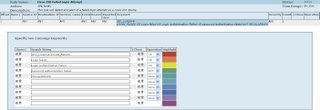
I hope this was a good example of some basic rule writing I've done with our MARS system. Any questions on how these rules are implemented please let me know and I can help.
login on-failure log
login on-success log
login block-for seconds attempts tries within seconds
Now let me briefly talk about the last command. This allows the IOS device to protect it's vty port by dynamically creating an ACL to block the IP that has failed
Sep 25 13:48:58 EDT: %SEC_LOGIN-5-LOGIN_SUCCESS: Login Success [user: marsguy] [Source: 10.27.
And if I fail login (which surely never happens!) it would look like this:
Sep 25 13:52:29 EDT: %SEC_LOGIN-4-LOGIN_FAILED: Login failed [user: ] [Source: 10.27.1.11] [localport: 22] [Reason: Login Authentication Failed] at 13:52:29 EDT Mon Sep 25 2006
Now we have some pretty nifty message... let's write a rule in MARS to generate incidents on successful and failed l

And here's a look at our failed login attempt rule. Again... edit the customizations to fit your environment:
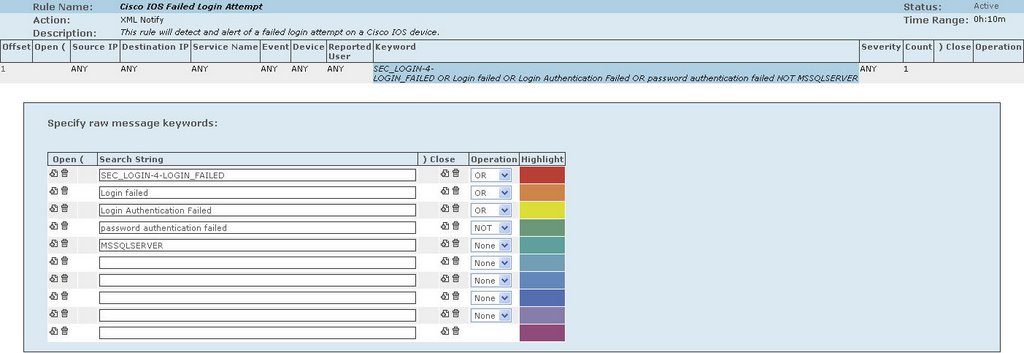
I hope this was a good example of some basic rule writing I've done with our MARS system. Any questions on how these rules are implemented please let me know and I can help.
Wednesday, August 09, 2006
Q&A: How does MARS work with Windows Event Logs?
This questions was posed by Jesmond Psaila in Australia:
This is an excellent question. Since I teach by example I'll show how this is done with an example. In this example we're going to take a Windows 2000 server (SP4 loaded) and have it log login failure and successes to the MARS appliance. We'll even create our own rules to trigger notification of login failures and successes. There's two techniques of getting logs onto the MARS appliance: push and pull. Here I'll be using the "pull" function, in which MARS will log into the server and poll the event log. I prefer this over placing SNARE on all servers and "pushing" the logs to MARS. This mini-tutorial make the assumption you have a base understanding of Windows server administration.
1) Configure your Windows 2000 Server to log login events:
I could sit here an explain this... but Microsoft has a brief tutorial on this. You can find it here. Below is a screenshot of my console after logging is fully enabled. If you view your Security Event Viewer now you should see login/logout events:

2) Configure CS-MARS to pull events from the Windows 2000 Server
Login to your MARS appliance and go to Admin -> Security and Monitor Devices -> Add. Now choose "Add SW security apps on new host." The screen should now look like this:
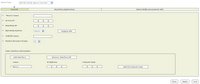
Fill in all fields and make sure to choose "Windows" Operating System. Then click the "Logging Info" button to choose your event polling options:
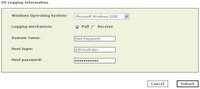
After this you can click "Done" and the device should be added. Make sure to "Activate" it in the upper-right hand corner.
3) As an aside you can configure how often MARS will go out and poll for events on the configured servers. This is found under Admin -> System Parameters -> Windows Event Log Pulling Time Interval. I use 60 seconds:

4) Next I like to always verify that logging is properly working.
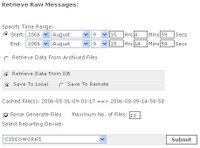
Let it run for about 10-20 minutes (good time to go grab a coffee) and come back and pull the raw events from MARS. To do this go to Admin -> System Maintenance -> Retrieve Raw Messages. I usually like to go back 10 minutes or more. Fill out the option like below and make sure to select just your Windows 2000 server (mine's named CISCOWORKS). Then click Submit.
5) After you have verified that you see messages... now you want incidents to be created when triggered events happen. I've created an example rule that will create an incident when a user logs into the server. Here's the details on it:
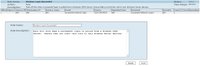
Obviously you can tweak this as you must. Find the keywords in the raw messages and use those as a "Keyword" to fire off incidents.
I hope this helped explain how to get Windows Servers logging with MARS and generating rules to fire events for server logins. Though this was done to help Jesmond, anyone with any questions or that would like more example rules please let me know.
Hi Mike,
I think you have a pretty cool blog. My name is Jes I work for a Cisco Gold Partner in Australia. I am focusing on Cisco Security at the time being. I have deployed a couple of MARS deployment mainly using network device for reporting agent.
I notice you have some Windows Servers reporting to your MARS.
I am working on a current opportunity where the customer would like MARS to report on sucessfull and unsucessfull logins for Windows users.
I know that Win Eventlogs capture this. with the use of a SNARE agent can I get MARS to provide an aggregate report of this login activity.
Regards
Jesmond Psaila
This is an excellent question. Since I teach by example I'll show how this is done with an example. In this example we're going to take a Windows 2000 server (SP4 loaded) and have it log login failure and successes to the MARS appliance. We'll even create our own rules to trigger notification of login failures and successes. There's two techniques of getting logs onto the MARS appliance: push and pull. Here I'll be using the "pull" function, in which MARS will log into the server and poll the event log. I prefer this over placing SNARE on all servers and "pushing" the logs to MARS. This mini-tutorial make the assumption you have a base understanding of Windows server administration.
1) Configure your Windows 2000 Server to log login events:
I could sit here an explain this... but Microsoft has a brief tutorial on this. You can find it here. Below is a screenshot of my console after logging is fully enabled. If you view your Security Event Viewer now you should see login/logout events:

2) Configure CS-MARS to pull events from the Windows 2000 Server
Login to your MARS appliance and go to Admin -> Security and Monitor Devices -> Add. Now choose "Add SW security apps on new host." The screen should now look like this:
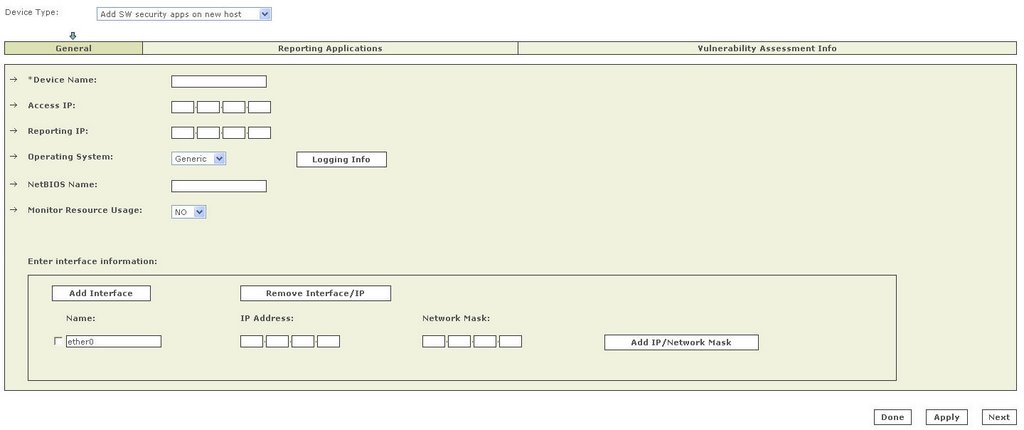
Fill in all fields and make sure to choose "Windows" Operating System. Then click the "Logging Info" button to choose your event polling options:
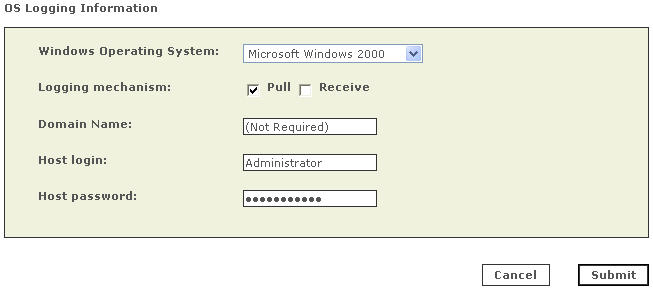
After this you can click "Done" and the device should be added. Make sure to "Activate" it in the upper-right hand corner.
3) As an aside you can configure how often MARS will go out and poll for events on the configured servers. This is found under Admin -> System Parameters -> Windows Event Log Pulling Time Interval. I use 60 seconds:

4) Next I like to always verify that logging is properly working.
Let it run for about 10-20 minutes (good time to go grab a coffee) and come back and pull the raw events from MARS. To do this go to Admin -> System Maintenance -> Retrieve Raw Messages. I usually like to go back 10 minutes or more. Fill out the option like below and make sure to select just your Windows 2000 server (mine's named CISCOWORKS). Then click Submit.
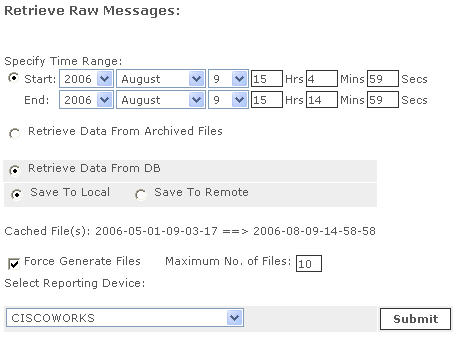
5) After you have verified that you see messages... now you want incidents to be created when triggered events happen. I've created an example rule that will create an incident when a user logs into the server. Here's the details on it:
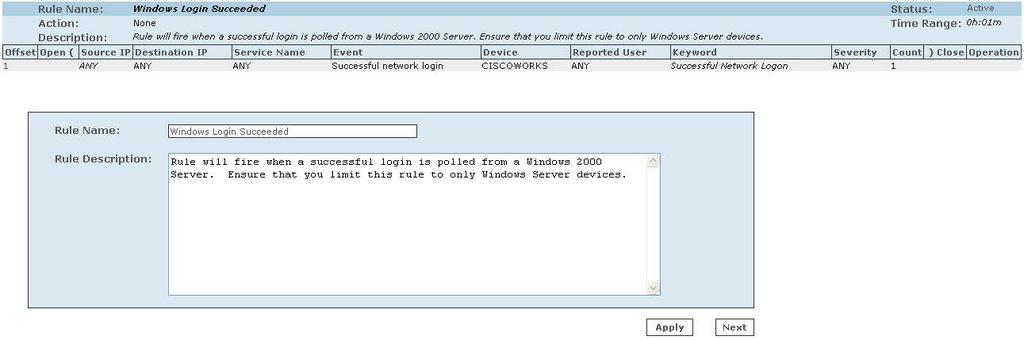
Obviously you can tweak this as you must. Find the keywords in the raw messages and use those as a "Keyword" to fire off incidents.
I hope this helped explain how to get Windows Servers logging with MARS and generating rules to fire events for server logins. Though this was done to help Jesmond, anyone with any questions or that would like more example rules please let me know.
Subscribe to:
Posts (Atom)
